
Technology
Discover Essential Features of Your New Samsung Tablet

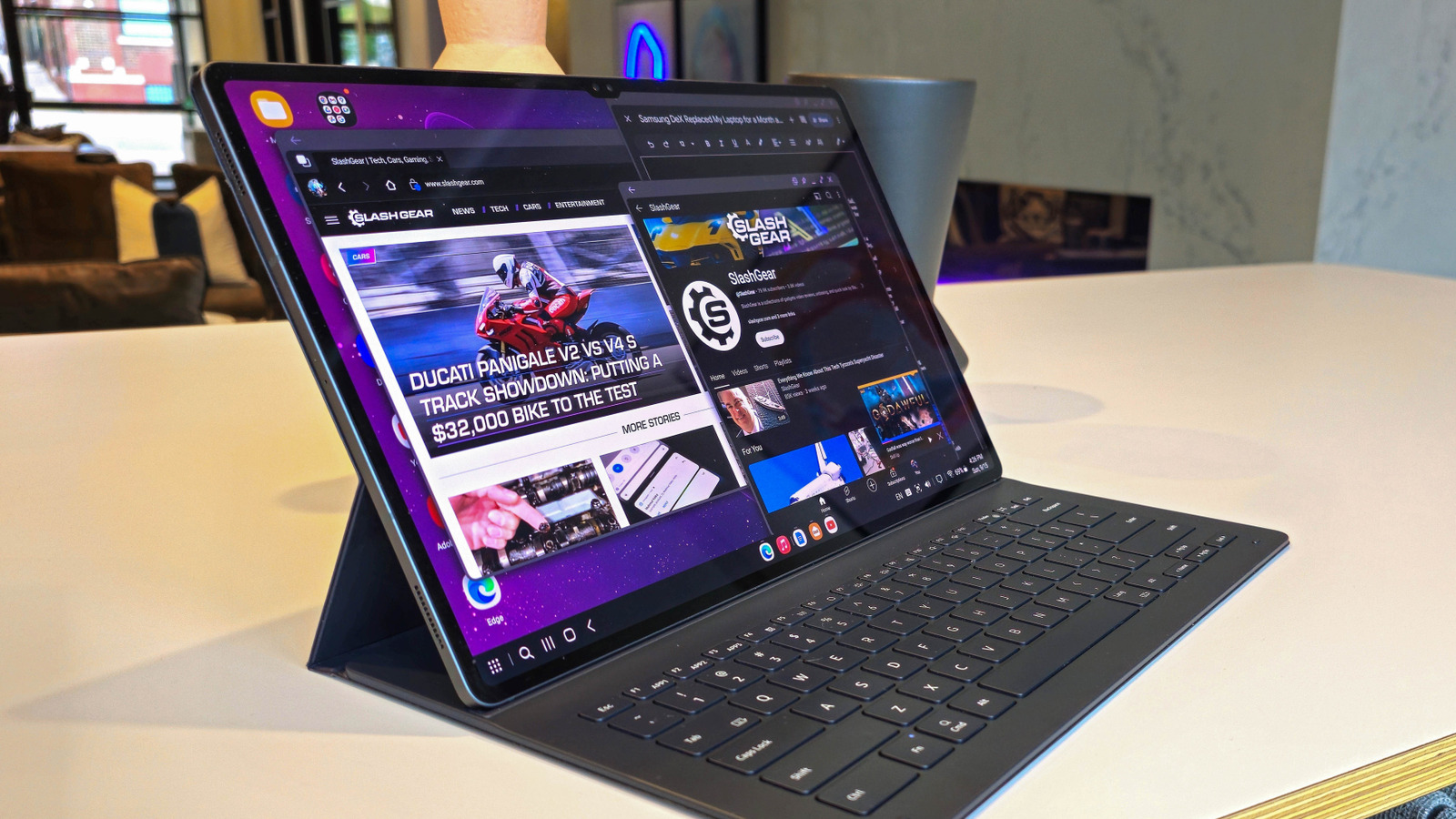
The holiday season has brought numerous new gadgets into households, with many people unboxing their new Samsung tablets. These devices are versatile tools, ideal for streaming movies, reading, or tackling work tasks. For those who are new to Samsung tablets, especially coming from an iPad, the transition may present some challenges. Samsung offers a wide array of tablets that cater to different needs, from budget-friendly options to high-end models capable of replacing traditional laptops.
Samsung’s tablets come equipped with the One UI software, which is built on Android. This interface is rich with features designed to enhance productivity and multitasking. Here are five essential aspects to explore with your new Samsung tablet.
Maximize Your Multitasking with Samsung DeX
One of the standout features of Samsung’s One UI is the ability to multitask seamlessly. The flagship feature, Samsung DeX, allows users to transform their tablet into a desktop-like environment. With the latest update, DeX has been enhanced to run directly on the tablet’s display. Users can open applications in resizable windows, similar to a traditional computer setup.
This feature is particularly beneficial for those who prefer a more structured workspace. Users can pair their tablet with a mouse and keyboard to handle productivity tasks effectively. The option to open multiple apps side-by-side further enhances the multitasking experience. To initiate this feature, users can simply drag an app from the app drawer or swipe from the screen’s edge when an app is in full-screen mode.
Explore the S Pen’s Unique Capabilities
Samsung’s S Pen stylus, included with many Galaxy Tab models, offers more than just a touch alternative. The S Pen is designed for various tasks, including note-taking and drawing. Users can hover the pen over the screen to access the Air Commands menu, which includes tools like Screen Write for capturing screenshots and Magnify for enlarging specific areas of the display.
A particularly innovative aspect of the S Pen is the Air Actions feature, which utilizes Bluetooth to enable remote control of the tablet. This allows users to manage music, navigate applications, and even take photos without direct contact. However, it is important to note that recent models, such as the Galaxy S25 Ultra and Galaxy Tab S11, have seen a reduction in Bluetooth capabilities, limiting the use of Air Actions.
Seamless Integration with Windows 11
For users with a Windows 11 PC, the Samsung Galaxy Tab can enhance productivity through the Phone Link app. This integration allows notifications from the tablet to appear on the PC, facilitates cross-device copy-and-paste functionality, and even enables users to run tablet applications on their computer’s display.
One of the most practical features is the ability to copy text or images between devices. For example, a two-factor authentication code copied on the PC will also be available on the tablet’s clipboard. This feature extends to Samsung smartphones, allowing for a streamlined experience across devices.
Additionally, the file drag-and-drop capability simplifies transferring documents between the tablet and PC. Users can open the My Files app on their tablet via Phone Link and transfer files easily, promoting efficiency in managing documents and media.
Customize Your Experience with Good Lock
Samsung recognizes that many users enjoy customizing their devices to suit their preferences. The Good Lock app, available through the Galaxy Store, offers a variety of modules for personalization. This toolbox allows users to modify aesthetics and functionality, catering to those who prefer a tailored experience.
Among the available modules are Theme Park, which enhances system theming, and Home Up, which provides detailed control over the home screen layout. Other utilities, like NotiStar, help manage notifications, while MultiStar expands multitasking capabilities, allowing for better organization of windowed apps.
At present, there are around 20 modules to explore, giving users ample opportunity to fine-tune their tablet to meet their unique needs.
Choosing Accessories Wisely
Acquiring accessories for your new Samsung Galaxy tablet is likely one of the first steps after purchase. While Samsung offers a range of official accessories, including cases and keyboard covers, prices can be steep. For instance, the Galaxy Tab S10’s Book Cover Keyboard is priced at approximately $350, which may not be justifiable for all users.
Shopping on the secondary market can yield significant savings. Users have reported finding open-box items at much lower prices. Third-party accessories from brands like Spigen also provide economical options without sacrificing quality. Notably, accessories for the Galaxy Tab S9 are compatible with the S10 series, providing additional avenues for savings.
In summary, new users of Samsung tablets, particularly the latest models, have an array of features and tools at their disposal. From the robust multitasking capabilities of One UI to the innovative integration with Windows 11, these devices offer significant flexibility and functionality. By exploring these features and making informed accessory purchases, users can fully leverage their Samsung tablets for both leisure and productivity.

Anchorage School District and Educators Reach Tentative Agreement

U.S. Strike Eliminates Al-Qaeda Leader Linked to Deadly Attack

Iranian Cleric Calls for Protesters’ Executions, Threatens Trump and Netanyahu

GBI Investigates Death of Wanted Man in Tattnall County

Jayda Cheaves Claims Lil Baby and Ari Fletcher Had an Affair

Rachel Campos-Duffy Exits FOX Noticias; Andrea Linares Steps In

Piper Rockelle Shatters Record with $2.3M First Day on OnlyFans

Meta’s 2026 AI Policy Sparks Outrage Over Privacy Concerns

Leon Goretzka Considers Barcelona Move as Transfer Window Approaches

Urgent Update: Denver Fire Forces Mass Evacuations, 100+ Firefighters Battling Blaze
-
Top Stories1 month ago
Rachel Campos-Duffy Exits FOX Noticias; Andrea Linares Steps In
-
Top Stories2 weeks ago
Piper Rockelle Shatters Record with $2.3M First Day on OnlyFans
-
Top Stories2 weeks ago
Meta’s 2026 AI Policy Sparks Outrage Over Privacy Concerns
-
Sports2 weeks ago
Leon Goretzka Considers Barcelona Move as Transfer Window Approaches
-
Top Stories2 weeks ago
Urgent Update: Denver Fire Forces Mass Evacuations, 100+ Firefighters Battling Blaze
-
 Health2 months ago
Terry Bradshaw Updates Fans on Health After Absence from FOX NFL Sunday
-
 Sports1 week ago
South Carolina Faces Arkansas in Key Women’s Basketball Clash
-
 Top Stories2 weeks ago
OnlyFans Creator Lily Phillips Reconnects with Faith in Rebaptism
-
 Top Stories1 week ago
CBS Officially Renames Yellowstone Spin-off to Marshals
-
 Top Stories2 weeks ago
Oregon Pilot and Three Niece Die in Arizona Helicopter Crash
-
 Entertainment2 weeks ago
Tom Brady Signals Disinterest in Alix Earle Over Privacy Concerns
-
 Top Stories2 weeks ago
Warnock Joins Buddhist Monks on Urgent 2,300-Mile Peace Walk