

Transform Your Security Footage into Stunning Timelapse Videos

The introduction of the UniFi Time Machine has allowed users to convert long-term security footage into professional timelapse videos. This open-source tool enhances the functionality of the UniFi Protect system, which serves as a comprehensive home security solution. Users can now efficiently create timelapse content that showcases environmental changes over time, addressing limitations present in the standard security footage options.
Enhanced Functionality for Home Security Systems
Many homeowners rely on security camera systems to monitor their properties. The UniFi Protect system has become a popular choice due to its seamless integration with existing UniFi Wi-Fi setups. It records continuously, provides motion alerts, and securely stores footage. However, users often desire more than just basic security features. They may wish to document longer-term changes in their surroundings, such as seasonal shifts or plant growth.
While UniFi Protect includes a built-in timelapse feature, it is limited to short intervals, making it less effective for extended periods. Users typically face challenges when trying to create a timelapse from existing footage. This process usually involves scrubbing through hours of video, exporting clips manually, and stitching them together. The results can be less than satisfactory since they often reflect merely sped-up footage.
Introducing UniFi Time Machine
The UniFi Time Machine addresses these challenges by sampling real-time footage at fixed intervals to create high-quality timelapse videos. Unlike traditional systems that focus on motion events, this tool captures snapshots consistently, ensuring that the resulting videos are visually appealing and informative. Users can set the app to generate timelapse videos ranging from 24 hours up to an entire year, providing substantial flexibility.
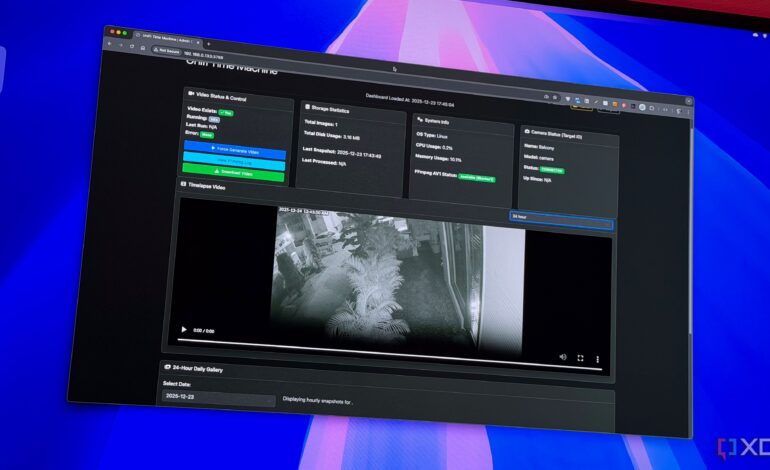
Setting up UniFi Time Machine is straightforward, especially for those familiar with Docker applications. Installation on a Synology NAS typically takes only a few minutes. Users need to extract their API key and the unique camera ID from the UniFi Protect app. The user-friendly web interface allows monitoring of connection status, CPU and memory usage, and whether FFMPEG is configured for video transcoding.
Once installed, users can periodically log in to check the processing status of their timelapse videos. The app can be utilized for various purposes, such as tracking weather changes, identifying movement patterns, or documenting plant growth. The versatility of the app enables users to adapt it to their specific needs, all while ensuring that footage remains local and secure.
While UniFi Time Machine may not dramatically enhance the overall network experience, its value lies in its ability to transform security cameras into powerful documentation tools. By focusing on consistent snapshots instead of motion-driven clips, users can effectively monitor and document their environments.
For those seeking a robust solution for creating timelapse videos from their security footage, UniFi Time Machine is a highly recommended open-source application. It provides a comprehensive feature set that meets the needs of users looking to leverage their security systems beyond basic monitoring.